

The Lazy Marketer's Guide: How to Use AI for Google Business Profile Local SEO
If you want your business to show up when nearby customers ask Google for recommendations, your Google Business Profile needs to be easy for both people and AI systems to understand. The good news is that you do not need a huge marketing team to make meaningful improvements.
Key Takeaways
- Use AI to audit missing profile fields, weak descriptions, service gaps, and review patterns before making updates.
- Write your Google Business Profile description in clear, factual language that explains who you help, where you work, and what you offer.
- Keep your reviews, Q&A, services, photos, and Google Posts active so Google has fresh local signals to interpret.
- Use AI for drafting and analysis, but have a real person review every update before it goes live.
- Align your profile with your website, schema, and local citations so AI search tools see one consistent business entity.
I am Amber Brazda, AI Search Specialist at AuraSearch, where I help local businesses turn traditional search visibility into AI search visibility. In this guide, I will show you how to use AI for Google Business Profile local SEO in a practical, low-stress way.
Your Google Business Profile is no longer just a business listing. It is one of the data sources Google uses to understand whether your business is relevant, trustworthy, and useful for local searches.
Here is the simple version of the workflow:
- Audit your profile with an AI tool like ChatGPT or Claude to find missing fields, weak descriptions, and category gaps.
- Rewrite your business description in plain language that clearly explains your services, location, and ideal customer.
- Choose the most specific primary category and add relevant secondary categories.
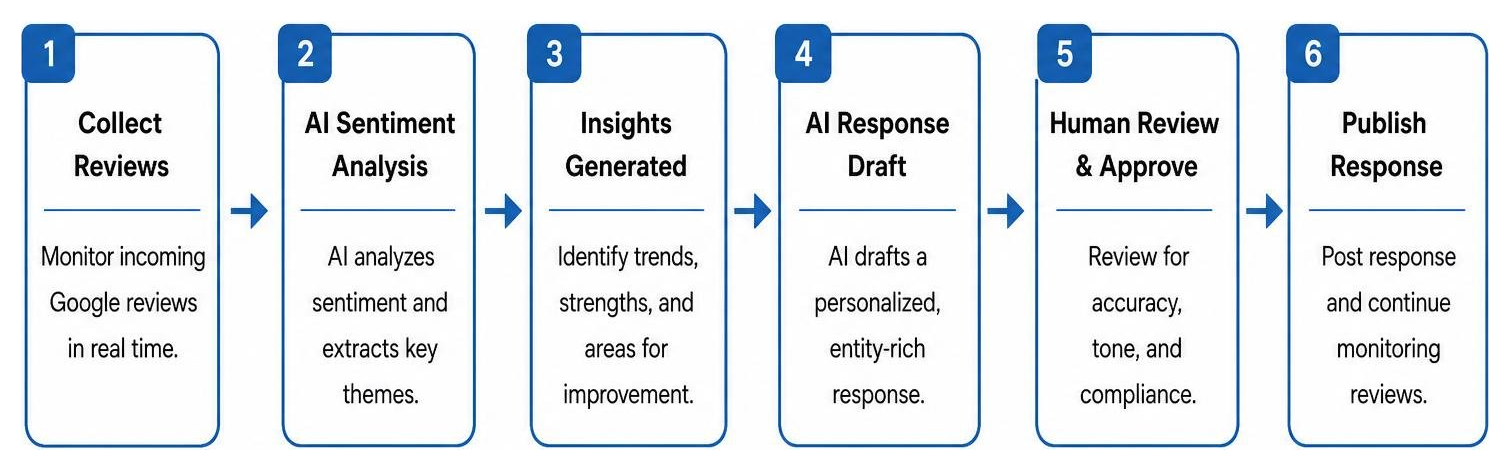
- Use AI to draft helpful review responses that mention the service provided without sounding repetitive.
- Publish Google Posts regularly so your profile does not look stale.
- Add clear Q&A answers that address the questions customers actually ask before they call.
- Match your profile details with your website and LocalBusiness schema.
This is not about gaming the algorithm. It is about making your business easier to understand, easier to trust, and easier to recommend.
How to Use AI for Google Business Profile Local SEO Without Overcomplicating It
Google looks at local results through three big signals: relevance, distance, and prominence. You cannot control where the searcher is standing, but you can control how clearly your profile explains what you do and why your business deserves to appear.
AI helps by speeding up the messy parts of profile management. Instead of staring at a blank description field or manually comparing competitor listings, you can use AI to spot gaps, organize service language, and draft better updates. If you want a deeper tactical walkthrough, this guide on How to Use AI to Optimize Your Google Business Profile is a helpful starting point.
At AuraSearch, we approach local visibility as part of a larger AI search strategy. Your profile, website, reviews, schema, and citations should all tell the same story. That consistency helps Google and emerging AI search tools understand your business as a reliable entity.
Why This Matters for Local Search Now
People no longer search only with short phrases like “plumber near me” or “best dentist in Austin.” They ask longer, more specific questions, such as “Who is a good emergency plumber open now that handles older homes?” AI search systems are built to answer those questions by pulling together information from profiles, websites, reviews, and other trusted sources.
That is why a complete, specific profile matters. A vague profile gives Google less to work with. A clear profile gives search systems more confidence when matching your business to a local need. Our guide to AI Search for Local Businesses explains how this shift is changing local discovery.
Step by Step: Improve Your Profile Fields with AI
Start with your categories. Ask an AI assistant to review your current primary and secondary categories against your core services and top competitors. Then use the output as a shortlist, not as an automatic decision. Your primary category should describe your main business as specifically as possible.
Next, improve your business description. Keep it factual, clear, and natural. Instead of writing “We are the leading provider of best-in-class solutions,” say what you do, who you help, and where you work. A useful prompt is: “Rewrite this Google Business Profile description so it clearly explains our services, service area, customer type, and differentiators in a natural local SEO style.”
Then review your services section. Each service should have a short description that helps a customer quickly understand the offer. If you provide multiple services, ask AI to group them into plain-language categories and remove overlap.
Finally, compare your profile to your website. Your name, address, phone number, service areas, opening hours, and service language should match across both places. This kind of consistency supports traditional local SEO and AI search visibility.
Use AI to Improve Reviews, Q&A, and Google Posts
Reviews are one of the richest sources of local business information. AI can help you scan reviews for patterns, such as services people mention often, common objections, repeated compliments, and customer language you should mirror on your profile.
For review responses, use AI to create a first draft, then edit it so it sounds like your business. Mention the specific service when it makes sense, but do not force keywords into every response. The goal is to be helpful, human, and specific.
Your Q&A section is another easy win. Ask AI to generate the questions a first-time customer would ask before booking, then answer them directly. Cover pricing ranges, service areas, appointment timing, parking, warranties, emergency availability, or anything else that helps someone decide faster.
Google Posts can also be planned with AI. Build a simple weekly rotation: one service spotlight, one customer question, one seasonal reminder, and one trust-building post. This keeps your profile active without making content creation feel like a full-time job.
Avoid Shortcuts That Put Your Profile at Risk
AI should make your process faster, not reckless. Do not publish auto-generated updates without checking them. Do not stuff keywords into your business name. Do not use a virtual address, coworking address, or PO Box if it does not meet Google’s rules. Do not create fake reviews or write responses that sound copied and pasted.
| Metric or Feature | Traditional Local SEO | AI-Assisted Local SEO |
|---|---|---|
| Optimization Speed | Manual and slow | Faster research, drafting, and QA |
| Content Relevance | Static keyword placement | Clearer entity and service matching |
| Review Management | Manual replies | AI-assisted sentiment analysis and response drafts |
| Risk Profile | Lower automation risk | Requires human review before publishing |
The safest approach is simple: let AI help you analyze, draft, and organize, then let a person make the final call. For a broader framework, read our guide to Google AI Optimization.
Build a Profile Google Can Confidently Recommend
The real goal is not to make your profile sound clever. It is to make your business easy to understand and easy to recommend.
If your Google Business Profile, website, reviews, and local citations all describe your business consistently, you give search engines stronger confidence in who you are, where you operate, and what customers can hire you for. AI can help you get there faster by finding gaps, rewriting unclear copy, and turning messy customer feedback into useful profile updates.
AuraSearch helps businesses improve visibility across traditional search and AI search surfaces, including Google AI Overviews, Gemini, ChatGPT, and Perplexity. If you want expert help aligning your local SEO with AI search behavior, explore our Trades and Services AI SEO services.
FAQs
Does Google Business Profile still matter with the rise of AI search?
Yes. Google Business Profile is still one of the most important sources of local business information. A complete, accurate profile helps Google understand your services, location, hours, reviews, and customer relevance.
Can AI write my Google Business Profile description safely?
Yes, as long as you review the final version. AI is useful for creating a clear first draft, but you should check every claim, remove hype, and make sure the description sounds like your business.
How does Google calculate local relevance and prominence?
Relevance is how well your profile matches the searcher’s need. Prominence is how well-known and trusted your business appears across reviews, links, mentions, and other signals. Distance depends on where the searcher is located.
How can AI help with Google Business Profile reviews?
AI can summarize review themes, identify repeated customer questions, and draft response templates. You should personalize each response before publishing so it sounds natural and accurate.
How often should I update my Google Business Profile?
A weekly rhythm works well for most businesses. Add a Google Post, upload a fresh photo when you have one, answer new questions, and review recent customer feedback. Do a deeper category, service, and description review every quarter.
How do I measure whether AI-assisted local SEO is working?
Track profile views, calls, direction requests, website clicks, local rankings, review volume, and conversions. If you are also measuring AI visibility, monitor whether your business appears in AI-generated answers for important local questions.